Data Collection and Post Processing
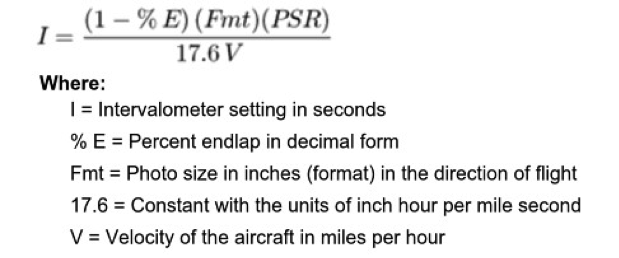
Data Collection. The first step in post processing is to load pictures into Structure From Motion (SFM) software (Verhoeven et al., 2013). The software requires that we have pictures of a given area from a camera that is changing positions, taking pictures at an interval, and captures the area being surveyed with pictures that have overlap and sidelap (common settings are sixty-five percent overlap and thirty-five percent side lap). This is necessary because the software needs to be able to match pixel points across pictures. The intervalometer settings rely on the height of the camera, the speed the camera is moving, the size of the sensor inside the camera, and the focal length – or the distance between the sensor and lens of the camera. The following equation explains the relationship between these factors and how to find the intervalometer frequency:
(Paine, 2012)
This equation shows us how many seconds must elapse between pictures in order to capture the terrain below in our specified overlap and sidelap. The equation takes our required overlap and sidelap, the camera’s sensor size and focal length, and the speed of the aircraft and outputs a number of seconds that we need to pause in between pictures. Then the camera can be programmed to take a picture, wait ‘I’ seconds, and take another picture, and continue at this setting.
Another factor to consider in this process is the resolution necessary for the application. The higher resolution needed (less ground distance per pixel) requires a lower distance from the camera to the ground, meaning more passes and consequently a longer flight time is required to capture the same area.
For agricultural applications, we need to map areas of 200 hectares (the average farm size in the United States) at a resolution of one meter per pixel or better. In an example scenario, this means that if we use a camera with a focal length of 4.5mm and fly at a height of 45 meters at 3 meters per second, we could expect a resolution of 3cm per pixel and could map 200 hectares in about 60 minutes.
The limiting factor and only constant in the process is the flight time of the UAV. Flight times are determined by the efficiency of the UAV and the size of the battery. Larger batteries are heavier and reduce efficiency, but also carry more charge and can allow for longer flight times. Optimal battery size can be determined by how much weight the UAV can carry and how agile we prefer the UAV to be.
We can conclude with the realization that there is a give and take between distances covered and resolution achieved. Higher flight altitudes mean larger survey areas and less resolution, while lower altitudes mean higher resolution at the cost of less area covered.
Once these factors are considered, and the best optimization of resolution and area constricted by flight time is realized, the mission can be planned and executed – resulting in a series of pictures with the desired overlap and side lap. Now we can import these images into our Structure From Motion software and begin our post processing.
Data Processing. When a camera takes a picture, it is representing a 3D space in a 2D picture. In post processing, software is taking this 2D representation and converting it back into a 3D space by using basic trigonometric properties on known locations of pixel points on the sensor of a camera. The first step is to parse through the images and identify unique pixel points across images.
Structure From Motion. Structure From Motion or SFM is a type of software that processes images and creates angularly and geographically correct maps as well as 3D models. SFM software begins its process by calibrating the images. This will identify points in our images of the terrain that stand out, and then match those points across pictures (Verhoeven, 2013). To break this down, this means that it will scan the first image, identify points that are recognizable by the software, assign the point an address, then move to the next image, find recognizable points, and assign these points addresses. If these points on the subsequent image are identified as the same pixel point as a point on a previous image, then the addresses will be matched. The software will run through all of the images imported and carry through the same process. Now we have a database of points, and where they lie on the pictures – across all pictures that contain the same point.
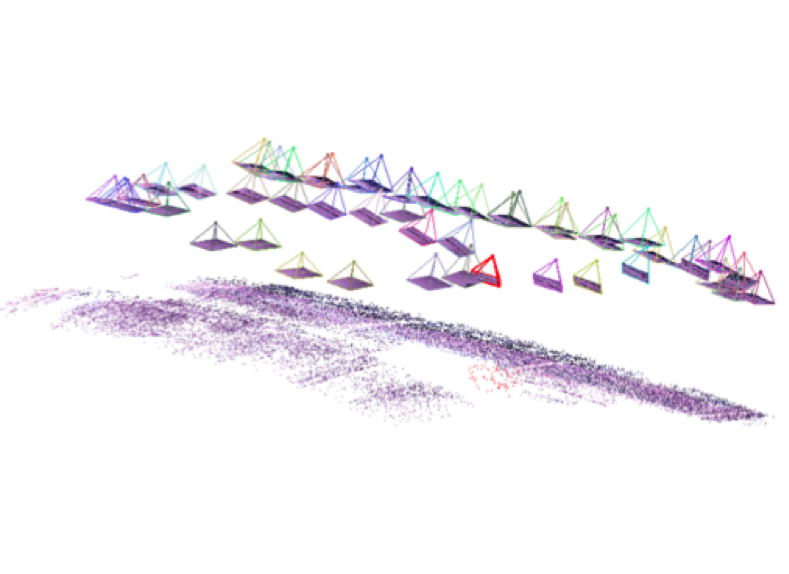
Sparse Point Clouds. Next, the SFM software constructs a sparse point cloud. A sparse point cloud is a visual representation of the calibration step, and shows us the points that were identified across pictures and their location on a local coordinate plane. This process takes the matched addresses of the points and determines their position on the camera’s sensor at the position that the image was taken. Then, the points are triangulated on a local coordinate plane based on the position of the point on the sensor at different locations of the camera over the terrain (Verhoeven, 2013). This means that the software knows the position of a point on the camera’s sensor at one location, and knows the location of the same point on the sensor at another location of the camera. These positions are triangulated and the pixel point is placed on the local coordinate plane. An example of this can be seen in the image below.
(Stockdale, 2014)
Sparse point clouds do not contain any useful data to humans, but images like the one above do help as a visual aid in understanding what the software is doing behind the scenes. The above image shows a field (on the bottom) being recreated with known pixel points. The floating objects are the pictures taken at different locations, and they are being processed to recreate the landscape (shown below them) in a three dimensional space.
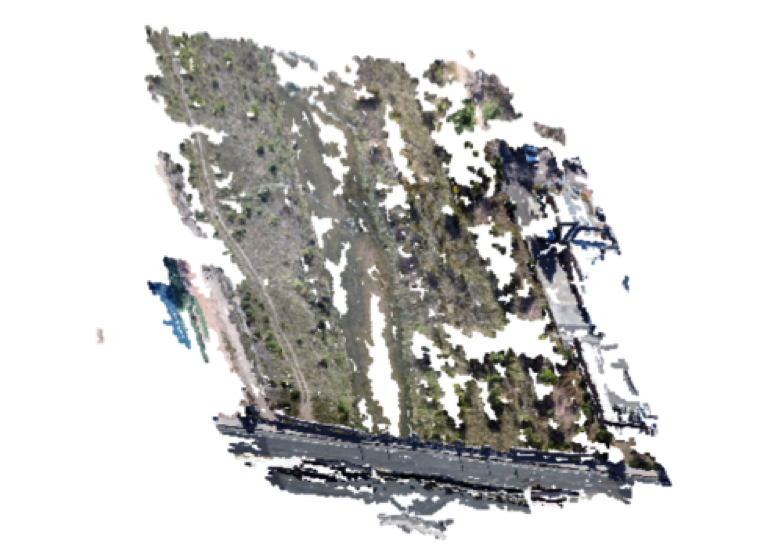
Dense Point Clouds. Once the software is done constructing a sparse point cloud by triangulating known points on a camera sensor across camera locations, we can fill in some of the gaps using a process called multi-view reconstruction. This creates a dense point cloud by estimating points in between the known points. This process takes the points between known points found in SFM and estimates their location based on their relative distances to known points. So, the software will find points between known pixel points by estimating their location from each known point. This helps to give us more points that we can consider accurate points, and make a more accurate model. Once a dense point cloud is constructed, it looks like this:
(Stockdale,2014)
The dense point cloud is a more detailed and filled out version of the sparse point cloud. Detail is added when the estimation algorithms fill in the spaces in between known points, and the result is represented in a three dimensional space like above. This image by itself is difficult to interpret and not particularly helpful. However, we can begin to see the general shape and texture from these point clouds. Like the sparse point cloud this image is only useful as a visual aid in understanding the software process.
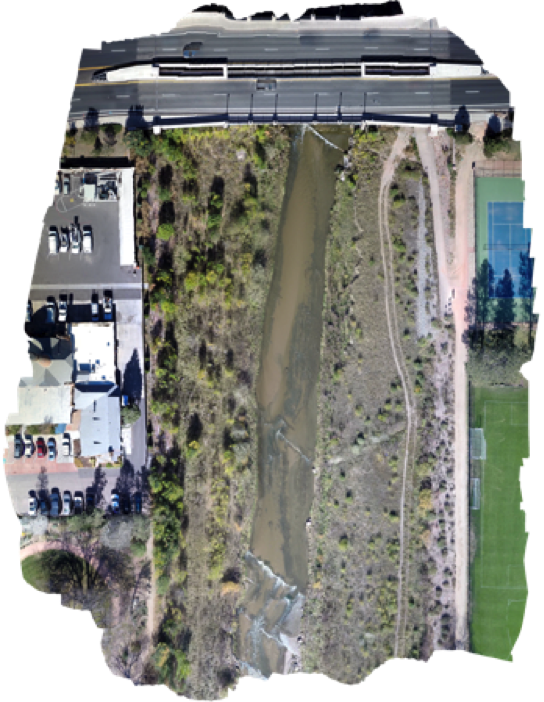
Orthorectified Images. The next step in the workflow is to create a mesh from these known and estimated points. The mesh is a 3D reconstruction of what the surface is known to look like. Once this is created we can take the final step of creating a texture layover. This takes the pictures themselves and stiches them together to create a mosaic, and lays this mosaic over the mesh, aligning known points on our model to the points in the pictures. Simply, it is the process of fitting a picture over a 3D surface to accurately account for changes in elevation and scale. The resulting image is finally something useful – an angularly accurate 3D representation of an area:
(Stockdale, 2014)
This map can be georeferenced as well, which allows us to take ground measurements and ground coordinates from our model. This particular image is of a section of river in Colorado Springs, CO. It is oriented so that the top faces north, and all relative angles and geographic locations are accurate. Without any more modification we can look at an image like this and see sections that are covered by trees, sections that are bare, where the river is, and areas of different color in the river suggesting depth or nutrient deposits.
Observations like these can help us to understand how an image like this might be used in a variety of applications like archeology, geology, energy management, wildlife conservation, land development, waste management, and many more. So far, most of the UAV research and development has been focused in agriculture, finding ways to save farmers money by locating problem areas, and treating them individually using variable rate technology rather than blanket spraying the entire field.
Vegetation Indicies
Sources:
Paine, David P., and James D. Kiser. Aerial Photography and Image Interpretation. 3rd ed. Chichester, UK: Wiley, 2012. Print.
Corsi, Cristina, Geert Verhoeven, Christopher Sevara, Wilfried Karel, Camillo Ressi, Michael Doneus, and Christian Briese. “Undistorting the Past: New Techniques for Orthorectification of Archaeological Aerial Frame Imagery.” Good Practice in Archaeological Diagnostics: Non-invasive Survey of Complex Archaeological Sites. Springer: Springer International, 2013. 31-61. Print.
Lebourgeois, A. Bégué, S. Labbé, B. Mallavan, L. Prévost, et al.. Can commercial digital cameras be used as multispecteral sensors? A crop monitoring test. Sensors Journal, 2008, p.7300 – 7322. <10.3390/s8117300>. <hal-00464025>
G. Bailey Stockdale (2015). Applied Remote Sensing With UAS. Unpublished Presentation, Department of Computer Science, GIS Lab, Colorado College.